Search This Blog

Tuesday, November 16, 2010

Pay-per-click Tools

There are many tools available to aid developers in their PPC management. Overture offers a variety of tools to aid in bid management, and there are several third party tools to monitor the costs and successes of a site’s bids. Using these tools effectively can greatly increase the likelihood for success in a PPC campaign.
Some of the tools that Overture offers include a ROI calculator, a CPM calculator, a term suggestion tool, and a view bids tool (http://www.content.overture.com/d/USm/adcenter/tools/index.jhtml). These tools are very helpful in the PPC process. The ROI calculator will determine return on investment by taking total monthly click-throughs (TMC) times average cost per click times the customer conversion rate times the average cost per customer (TMC x Est. Ave. CPC x Conv. Rate x Profit/ Conversion). This tool can be helpful in determining estimates for maximum cost per clicks. The CPM calculator measures the ROI (return on investment) of a CPM (cost per thousand) impressions advertising model, such as many banner and button buys. The term suggestion tool should be used during the keyword development in the planning phase and throughout the website creation process. This tool will tell a developer about related searches that include given search term and how many times that term was searched for in the last month. The view bids tool is essential once a PPC campaign has begun. (See Appendix 3-11) This tool will tell a developer the selling prices for each keyword phrase. This can be important information when a “bid-war” starts between two sites. Google offers some similar tools for PPC bid management within the interface of their advertising program “Adwords”. These tools are constantly being improved and should be monitored and utilized by developers closely.
There are also several third-party programs for PPC management. Some of the most well known programs include Go Toast (www.gotoast.com), and Bid Rank (www.bidrank.com). These programs allow developers to manage hundreds of keywords at one time and track their performance. Good PPC ad campaigns utilize obscure niche keywords and can include many, many phrases. In order to use the best phrases with justifiable ROI it may be necessary to use a third party program to reduce valuable time spent managing these campaigns. These programs allow users to set up automated bidding systems based on time, price, and budget that would otherwise take significant man-hours to maintain. The developers of serious PPC advertising campaigns will immediately recognize the value of such analysis and improved management.
PPC campaigns can be a very good short-term solution, and in some cases a long-term solution as well. The key to successful PPC campaigns is close monitoring of statistics to deduce which phrases offer the necessary ROI to justify their costs. PPC campaigns can help improve customer awareness of a company’s site and serve as a good solution for obtaining traffic until rankings through unpaid listings can be achieved. PPC campaigns may also help drive traffic during periods where free listing positions suffer due to the sometime unstable nature of free search engine rankings. PPC campaigns can certainly help in the promotion of a website if managed appropriately.

5. Other SEO tools


Here is my full listing of different types of SEO tools
  1. Keyphrase analysis tools (for SEO and also PPC)
  2. Keyword Density Tools for SEO
  3. Backlink or inbound link tracking tools
  • Yahoo Site Explorer - this is an excellent backlink checker.
  1. Robot Crawling tools for SEO
  2. Index inclusion tools for SEO
  • See my post on Index inclusion tools
  1. Reputation management tools

Mainly PPC Analysis tools

  1. Bid management tool in particular its capability to manage a portfolio of keywords against different targets of conversions, CPA, revenue etc and also any requirements for page tagging or third-party cookies.

Both SEO and PPC Analysis tools

  1. Keyphrase management tool / repository
  2. Keyword ranking tools - for SEO mainly but can do PPC
  3. Standard Web Analytics tools
Simpler analytics conversion tracking tools

4. Pay Per Click keyword tools


  • Google Adwords preview tool - shows paid links in different countries without charge.
  • Adwords Sponsored links tool (UK) - shows sponsored links only.
  • View Overture bid ranks for UK

4. Pay Per Click Learning tools

  • Google Adwords Learning Center - this is an excellent free guides to the basics and optimisation of PPC.
These software or web services report on your position in different search engines for different search terms. Be aware that these tools may contravene Search engines terms of service. Best known ranking tools include:
  • Advanced Web Ranking (Paid) - I use this one most and recommend it. Also tracks PPC.
  • Agent Web Ranking (Paid)
  • Digital Point keyword tracking (Free). Unlike the others, this is a free service, but can be used for smaller sites.
  • Web CEO http://www.webceo.com A popular tool featuring a range of features from keyword analysis, site submission to rank checking.
  • Web Site CEO http://www.websiteceo.com A similar package.
  • Web Position. Formerly Web Position Gold (WPG), now owned by WebTrends.
You should think through the following issues when using these tools:
  • Some of these services may contravene Googles terms of service (www.google.co.uk/intl/en/webmasters/guidelines.html) although they are widely used
  • Minimising the number of ranking queries and using the Google API Key are likely to reduce this risk
  • These tools are particularly necessary if you have a large keyword portfolio or international sales are important so you can track performance in different countries
  • For some agencies, this is the primary method of reporting success, but of course share of search on a given phrase, number of clicks and whether they convert is a much better measure of effectiveness.
These Search Engine Optimisation (SEO) tools analyse the number of occurrences of keyphrases / keywords on the page. They are useful for comparing your pages for SEO effectiveness against competitors.
  • Abakus Topword Key phrase density checker - excellent free tool for testing home pages and showing keyword frequency and also meta tags and meta description. Watch for use of 2 or 3 word key phrases on a page which shows effective optimisation.
  • Ranks NL Keyword density or prominence - Similar tool with more sophisticated analysis but with some restrictions on page size.
  • Digital Point tools interfaces combine some of the above. Also offers free tools based on Google API.
  • URLtrends - Helpful - Provides a summary of ranking of sites using a range of different tools. As the name suggests, also provides trends. Choose 'Can't wait' option for quicker results for UK sites.
  • Keyword Count - Tool for comparing keyphrases on a site against competitor sites
  • MarketLeap - 3 different tools for assessing links in, keyword saturation.
  • Google Keyword tool (free access) - great for finding relative importance of search terms related to a keyword including synonyms. NB. Don't miss the "Related Sites" tool on separate tab shows keywords related to your site. Check you have selected the right term.
  • Google Traffic Estimator (free) - Tool for summarising volume and CPC for up to 5000 key phrases - can be filtered by country. See my Google keyword tutorial for a guide on the Google Keyword tool and Traffic Estimator.
  • Google trends tool - great for identifying peaks, periodicity or long-term trends in how your users search for you or your products in different countries. See my tutorial How to use Google Trends
  • Google Suggest - A new tool in Google labs that gives keyphrase suggestions according to the number of pages on that topic.
  • Yahoo! UK Search Marketing (formerly Overture) search term analysis tool - NB. Tool not currently supported or recommended. Formerly, the original and easiest to use keyword tool useful for finding numbers searching on key phrases and related keywords, but remember it excludes Google and Microsoft Search.
  • Nichebot - Paid tool but US based - integrates Google and Wordtracker and shows competitiveness for limited number of related keywords. The next two are better known and have UK databases.
  • WordTracker Gives similar results to Overture, but accross all networks. US-based, but with UK module. Based on usage of metacrawler meta search engine which is not a representative audience for mainstream search engines.
  • Keyword Discovery (paid) Paid tool similar to Word Tracker from Trellian but offers sophisticated trend tracking and regional - now with UK module. Again issues with sources of data - from Metacrawlers.

1. Search engine keyphrase analysis tools


  • Google Keyword tool (free access) - great for finding relative importance of search terms related to a keyword including synonyms. NB. Don't miss the "Related Sites" tool on separate tab shows keywords related to your site. Check you have selected the right term.
  • Google Traffic Estimator (free) - Tool for summarising volume and CPC for up to 5000 key phrases - can be filtered by country. See my Google keyword tutorial for a guide on the Google Keyword tool and Traffic Estimator.
  • Google trends tool - great for identifying peaks, periodicity or long-term trends in how your users search for you or your products in different countries. See my tutorial How to use Google Trends
  • Google Suggest - A new tool in Google labs that gives keyphrase suggestions according to the number of pages on that topic.
  • Yahoo! UK Search Marketing (formerly Overture) search term analysis tool - NB. Tool not currently supported or recommended. Formerly, the original and easiest to use keyword tool useful for finding numbers searching on key phrases and related keywords, but remember it excludes Google and Microsoft Search.
  • Nichebot - Paid tool but US based - integrates Google and Wordtracker and shows competitiveness for limited number of related keywords. The next two are better known and have UK databases.
  • WordTracker Gives similar results to Overture, but accross all networks. US-based, but with UK module. Based on usage of metacrawler meta search engine which is not a representative audience for mainstream search engines.
  • Keyword Discovery (paid) Paid tool similar to Word Tracker from Trellian but offers sophisticated trend tracking and regional - now with UK module. Again issues with sources of data - from Metacrawlers.

2 Free PPC Tools for You and the Competition

Posted by admin on August - 11 - 2009
  • 0diggs
Ahh Pay Per Click (PPC), not nearly as many variables in contrast to SEO – the organic other side of the equation. The following PPC tools are a must have for any marketer of any size. Use these performance-enhancing tools not only for your own website(s), but on the competition as well.

PPC Tool : Google AdWords Bid Simulator

Have you ever wondered about the potential benefits a bid increase would bring to your Google AdWords PPC campaign? End the wonderment…

Pay per click: anti-fraud strategies and tools

There's no doubt that Pay per click (PPC) advertising can be a very profitable and cost-effective way to drive targeted visitors to your site. If you're new to the world of PPC advertising, you may want to read my introductory article on pay-per-click first.
Aside from the ongoing problems of pay per click, such as getting into bidding wars, there is a much more sinister challenge to overcome - fraud. 
It's quite amazing the lengths that some publishers will go to to commit fraud; and I'm not talking about the webmaster who clicks on your ad once a day to clock up his revenues, or the competitor who occasionally clicks on your ad out of spite. What I'm referring to is those parties who create complex robots to generate thousands of clicks, while spoofing IP addresses in order to fleece their advertisers and avoid detection. Then there's the competitors who do similar things - not to build revenue for themselves, but to drive other advertisers out of PPC listings and at times, out of business.

Expand Your Keyword List For Free: 6 Keyword Tools You Should Be Using (but probably aren’t).

April 15th, 2008 | Amber | Keyword Research
3ppc_construction.jpg
As part 2 of our keyword research blog series, I’d like to dive right into the topic of free keyword research tools. One of the first things I think of when someone says keyword research is all the free keyword research tools that are available. From the number of searches, to the number of potential clicks per month, clicks per day, to average cost-per-click and ad position, and demographics, keyword research tools can give you a plethora of information concerning a particular keyword or set of keywords you’re researching. These tools are very helpful when beginning a search marketing campaign because they can give you an estimate of how much traffic you’re going to receive from these keywords, therefore allowing you to pick the keywords that will drive the most targeted/qualified traffic to your site. In other words, they help you get more bang for your buck! In the pay-per-click world, they are a must!
Below are the 6 most helpful free keyword research tools I could find. I’ve described what information each tool provides.
9. Search Engine Land
Search Engine Land is a news and information site covering search engine marketing, searching issues and the search engine industry. The site is led by veteran journalist Danny Sullivan, formerly affiliated with Search Engine Watch.
Specifically, the paid-search column is an excellent place to learn paid-search strategies, as well as a way to get insight on many tricky paid-search issues like bid management, landing pages, tracking issues, quality score considerations and a whole lot more.
9. Search Engine Land
Search Engine Land is a news and information site covering search engine marketing, searching issues and the search engine industry. The site is led by veteran journalist Danny Sullivan, formerly affiliated with Search Engine Watch.
Specifically, the paid-search column is an excellent place to learn paid-search strategies, as well as a way to get insight on many tricky paid-search issues like bid management, landing pages, tracking issues, quality score considerations and a whole lot more.
8. WebmasterWorld Forum
WebmasterWorld is a forum chock-full of useful PPC information. For information on PPC advertising across all engines, I frequent the areas listed below. This is also a great place to post PPC-related questions.
When I was getting started in this business, I visited these sites to get information on complicated issues like match-typing for each of the Big Three PPC engines. Forum moderators are pretty knowledgeable.
I frequent these areas on WebmasterWorld Forum:
  • MSN/Microsoft adCenter: News and discussion around MSN adCenter
  • Yahoo! Search Marketing Pay-Per-Click Advertising: Information on Y!SM and the Yahoo Panama system.
  • Google AdWords: Google AdWords news, AdWords API, and general Google PPC topics.
  • Pay-per-Click Engines: General PPC topics and alternative engines such as Kanoodle.
7. Acquisio
Acquisio SEARCH is a white-label productivity platform designed specifically for SEM agencies. Here are some advantages of using this service:
  • It creates campaigns across all search engines from one interface.
  • It has keyword recommendation tools and campaign creation wizards.
  • It has a cross-engine bulk editing tool (similar to AdWords Editor) for the Big Three search engines: MSN, Yahoo! and Google.
  • Its reports, charts and graphs are customizable, with a section to add specific comments.
  • Pricing is scaled for various sized companies.
Disclosure: Acquisio is an advertiser in Web Digest For Marketers.
. Google Website Optimizer
Google now offers a gratis testing and site-page optimization tool. After some intelligent planning (Google suggests places to get started) and selecting page design (either multivariate or a simple A/B setup), you can be well on your way to testing landing pages or regular site pages.
Here are a couple of benefits of using Website Optimizer:
  • Projections of time to completion of tests and other aids mean that you don't have to be a statistician to pursue the advanced testing.
  • The reporting is powerful. Both the reporting and the rotation functions work on their own, without any special, clever effort from the user.
5. Google Insights for Search
With Google Insights for Search, you can compare search-volume patterns across specific regions, categories, and time frames. Here are a couple of my favorites:
  • The Seasonality tool allows advertisers to anticipate demand for business at particular times of the year. It can show trends back to 2004 at the same time.
  • Geographic Distribution allows advertisers to see search-volume distribution over cities and regions. With this tool, I learned that "football" was more popular in the UK, while "basketball" was more popular in the US. This could be important information if you were selling sports apparel or equipment in a number of international markets.
4. Clusty
To enhance keyword research and find additional keywords, I like to use clustering engines like Clusty. Clustering engines group search results into folder topics and can help greatly expand the breadth of a campaign.
Take a look at the following example. Using Clusty.com, the phrase "Kitchen Aid blender part" gave me the following results:
Appliances
Mixers
Food processor
Immersion blender
Replacement part
Amazon
Instead of honing in on "Kitchen Aid blender parts," these results provided me with ideas I used to create the following ad groups:
Kitchen Aid appliance parts
Kitchen Aid mixer parts
Kitchen Aid processor parts
Kitchen Aid replacement parts
3. Microsoft adCenter Labs
Microsoft adCenter Labs has a bunch of neat tools that can be used to gain insight into the way people search. One of my favorites is the search funnel tool, which allows users to see terms that were searched before or after a particular query.
For the term "sofa," the tool indicated that some of the queries that came after were "furniture," "living room furniture," "lazyboy," "couch" and "eBay." The tool gives you ideas for other terms to include in campaigns for more keyword breadth.
2. ProtoShare
ProtoShare is a collaborative Website development tool. It improves overall team communication and allows all stakeholders (in our case, clients, marketing and design) to comment on test Web pages before deploying Web development resources, which reduces rework later. It's simple to use and browser-based and works in real time. At time of writing, a complimentary 30-day trial was available.
1. Google AdWords Editor
This neat application allows you to make changes in your AdWords account without being logged in. It's great to use when you don't have a connection (on a plane, for example). It also makes some AdWords-related tasks easier than doing them directly in the interface.
Here are some of my favorites:
  • Move campaign elements. Easily move campaigns, ad groups, keywords and ads using AdWords Editor. The copy-and-paste process isn't exactly intuitive in Editor; but, once you get the hang of it, it's fairly straightforward and worth its weight in gold.
  • Import and export elements. This is one of the easiest and fastest ways to export elements to Yahoo! or MSN without paying for third-party software.
  • Find-and-replace function (plus other append tools). This tool makes it easy to make bulk adjustments to keywords, ad copy or URL information.
  • Find spelling mistakes. Editor shows the red squiggly lines under misspelled or suspicious-looking words (similar to MS Word). Note: The AdWords interface doesn't catch spelling errors when you're creating ads directly in the interface.
  • Find duplicate keywords. When accounts get large, it can be tough to remember if you've used a keyword before. So, you can use this tool to avoid redundancy.

Top PPC Tools & Resources from a PPC Guru

Mona Elesseily of Page Zero Media has one of the highest profiles of any PPC practitioner I know. She is a featured speaker at Internet Marketing conferences around the world (Search Engine Strategies, SMX East and West, Ad:Tech, WebmasterWorld PubCon Vegas), a columnist for Search Engine Land and author of a forthcoming book on Search Marketing. -LC
But, more importantly than talking the talk at high-profile trade shows, Mona walks the walk. She eats, sleeps and breathes PPC every day for clients across a wide range of industries.
The tools and resources below are the same ones Mona herself uses. She points out exactly which features she finds useful and, specifically, which resources on each site help her stay on top of her industry.

"Finally: PPC tools and training that actually works" 

PPCKahuna is a community, not just a "bag of tricks"

PPCKahuna is a comprehensive yet affordable collection of tools to make it faster and easier for you to pick the RIGHT keywords for your campaign, saving you time and money.

Once you've decided what your goals are, and if you've decided that PPC advertising is the way to go, then you need to find tools to help accomplish that goal.

And PPCKahuna has a whole offering of tools to make your PPC advertising turn clicks into money for you.

PPCKahuna helps you get started by finding your niche, picking your products, and setting up your sites.

Then you'll also have access to ALL the resources you need to market to your niche, develop your PPC campaign, and how to manage that campaign once it starts.

PPCKahuna includes

* Keyword research tools
* Automatic landing/sales page generator
* Membership in a community forum of fellow marketers
* A "14 Day Success Plan"
* Automatic ad copy creation "wizard"
* Ongoing expert training
* Challenges and contests with great prizes, to test your affiliate marketing skills

PLUS: a FREE webpage analyzer and other FREE bonuses to get you inspired and started right away.

All for $1 for the first 30 days (and there's a 30-day money back guarantee)

PPCKahuna isn't just a suite of tools you buy once. It is a whole online community complete with experts ready to offer help and advice all along the way

WordStream Launches Two Free Niche Marketing Tools for SEO and PPC

by Dev Basu on December 17, 2009
WP Greet Box icon
X
Welcome Googler! If you find this page useful, you might want to subscribe to the RSS feed for updates on this topic.
So popular keyword research and grouping tool Wordstream has added some new features to their free tools. I’ve trialed their solution before, and it’s definitely an interesting utility for the serious PPC marketer and those who do advanced SEO campaigns with multiple keyword buckets.  Have a look at their new tools via the press release below:
WordStream’s new tools, The Keyword Niche Finder and The Free Keyword Grouper, are designed to help businesses and marketers solve specific problems:
  • The Keyword Niche Finder – Instantly identify and target the most profitable keyword niches
  • The Keyword Grouper- Group and organize vast lists of keywords into actionable keyword groups to turn into ad groups or website content
Strong keyword organization is the foundation of successful search marketing, and WordStream’s Free Keyword Grouper lets marketers take massive lists of target keywords and instantly group these keywords into tightly-knit, relevant groups. This advanced level of keyword organization is critical for creating effective ad groups for PPC campaign advertising and for informing content creation and site navigation for SEO.
With The Keyword Niche Finder, marketers can type in terms related to their business and receive a list of the most popular and relevant keywords for their websites, along with the most interesting keyword niches or clusters. Marketers and website owners can leverage the results from The Keyword Niche Finder to build and structure intelligent website information architectures or create new subsections of their existing sites to drive traffic and collect new business opportunities.
“One of the biggest challenges for business owners is determining where to begin their keyword research and how to continually expand and refine their campaigns to get maximum returns,” says WordStream Founder and Vice President of Product Development Larry Kim. “With our two new free tools, we’ve armed marketers and business owners with the power to instantly receive well-organized, prioritized lists of the most profitable keyword opportunities in their niche.”
WordStream’s subscription-based service also announced a major upgrade recently, including integration with Google Analytics and sophisticated multi-source keyword analytics. It provides users with a tool-set to take those insights to the next level by continually monitoring the performance of their keywords and offering actionable keyword suggestions that helps them grow their campaigns and revenues, all for a very affordable monthly fee
 

PPC Software, PPC Tools, Free PPC

(By a guest writer)
<< Previous Page: Writing Ads, Tracking & Improving Campaigns
Pay Per Click SoftwarManaging PPC campaigns can be a time consuming process. There are specialist programs to help handle bid management and optimisation. Some of them even work to analyse your landing page and improve the quality of the page - this reduces bid costs and improves CTRs and conversions.
Get Free PPC Ads
Despite the apparent oxymoron, you can get ads for free on some of the PPC networks. Yahoo, Google and other PPC networks often give away vouchers or a certain value of free ads as special offers and promotions or tempters to get you to sign up. Very often there are no strings attached and you don't need to spend any of your own money to avail of these offers. Sites like these: 1 2 3.
Conclusion
This isn't an end all guide to pay per click advertising. In fact, even if you follow this guide step by step you'll probably fail. There are a million ebooks promising riches through pay per click advertising, but the truth is it's an art form.
You have to be motivated. You will lose money sometimes. You'll need the patience to spend 20 hours working on a campaign only to have it lose you a few hundred dollars.
The key to success is to keep trying new things. Most of thePPC Chart - Market Share 2007 time you'll get marginal results. Sometimes you'll hit a home run and find a gold mine that can earn you thousands of dollars a day. But you don't need a home run. You need a series of base hits. The goal is to build up as many semi automated income streams as possible.
It takes money to make money. But once you have 5-6 campaigns earning you $50 a day each, well, that's not bad money considering you'll only have to check on them maybe once or twice a week.
Hard work, creativity, testing, tracking, tweaking, and always learning. That my friends is the key to building up profitable, automated income streams with pay per click advertising.
ABC Tires:
For my ABC Tires example they offered a ton of modifier words and about a dozen search terms (including the modifiers I was able to make many additional keywords). A couple of the terms they showed me were obvious random one off type searches that a random surfer searched for twice, but many of the terms lead to conversions. The lateral search and thesaurus make WordTracker great.
Digital Point Keyword Research Tool:
try Digital Point's Free Keyword Research Tool free
Digital Point's keyword tool compares Overture and WordTracker data side by side.
Benefits:
  • It is quick, free, & easy to use.
  • It gives multiple suggestions side by side.
  • It is the sum of the pieces of WordTracker and Overture's Search Term Suggestion Tool.
Negatives:
  • It lacks some of WordTrackers more advanced features.
Keyword Intelligence:
subscribe to Keyword Intelligence ($89 to $189 per geographic market)
Benefits:
  • It costs ($89 to $189 per market), so not everyone has access to the data.
  • Offers 3 months historical data.
  • They claim to track 25 million actual web users. Most marketers do not have direct access to spamming this data.
  • Shows keyword research data by geographic market.
  • Tracks actual traffic.
  • Tracks keyword success rates, which shows what percent of clicks ended up in people clicking a result.
  • Breaks results down by market.
  • They made the industry data a downloadable spreadsheet & the industry data keywords allow you to click on them to pull up the deeper terms containing that search term.
  • Viewing the success rates for a good number of terms gives you access to how people search and helps you better understand the psychology of search.
Negatives:
  • Considering that Google.com has hundreds of millions of searches daily, the market data from only 25 million web users is a bit limited.
  • It has a monthly cost of $89 to $189 per market.
  • It offers industry specific keyword terms, but in most cases I found many of the terms overtly generic, and they need to offer additional filtering options from within those industries to make the data more useful. Plus they only list 100 terms per page, which makes some of data not as easy to work with.
  • Some of the industry terms are mistargeted. Foo Fighters is not a web development term.
  • I did not notice a related terms function. Surely with the data they have access to and some of the company they have partnerships with they could help recommend related terms, and not just terms having the exact words you enter in them. If you are just giving me terms that are extensions of what I am typing in then why don't I just grab more terms by running a Google AdWords account and tracking the keyword data in referal strings?
Negatives:
  • Since Google is the largest engine many people may use this tool and bid up these terms.
  • Like all things Google, they do not share specifics on how they gather this data or what it means to you.
ABC Tires:
For my ABC Tires example Google Keyword Sandbox recommended 4 different terms, and all of them have converted for me. It also listed a wide variety of semantically related search terms and modifiers, which can be used to help extend out a keyword list.
Google also has a highly useful keyword research tool within their AdWords interface when you log in. It automates keyword research based on entering a URL or site. It also allows you to find related keywords based on words you enter or words that are already in your account. The biggest downsides to the Google tools are that their search volume estimates suck and you can be fairly certain that some of your competitors will also be using the tools built into the AdWords system. Based on using all of these tools I believe that combining that tool with the SEO Book keyword research tool is just about all you need to use.
Overture (which is being rebranded as Yahoo! Search Marketing) Keyword Suggestion Tool:
try the Overture Keyword Suggestion Tool free
Benefits:
  • It is quick, free, and easy to use.
  • Overture has a large partner network to gather data from.
  • Overture also offers a view bid price tool
  • Overture offers search research by geographic region
Negatives:
  • Many bid management tools and rank checkers scour the Yahoo! network, causing traffic numbers to be heavily skewed toward high value search terms.
  • Overture does not seperate out plural and singular versions of keywords.
  • Does not show related terms, only terms containing the exact phrase you search for.
  • This was the original free search term suggestion tool, so everyone and their dog who does keyword research looks at this data.
ABC Tires:
For my ABC Tires example Overture only showed the four most common terms, all of which lead to many conversions, but were some of the most expensive terms.
SEO Book Keyword Research Tool:
try the SEO Book Keyword Research Tool for free
Benefits:
  • Free.
  • Easy to switch between markets.
  • The results cross references many keyword research tools (almost every tool listed on this page - and a few that are not) so you can mix and match using them quickly and easily.
  • Also links to different information systems (news search, directories, blog search, tagging sites, etc.) to help you find useful resources and things people are discussing in your marketplace.
Negatives:
  • Driven off of Overture, so any problems with Overture's data occur in my tool as well.
WordTracker:
subscribe to WordTracker
Benefits:
  • Helps you find or think of related terms by offering a built in thesaurus and lateral search. The lateral search looks at page details such as keywords of pages which are thought to be competing or related to your topic.
  • WordTracker allows API keyword research access.
  • Has more features than most other keyword research tools.
  • The added features, such as showing the lateral terms, saves me a ton of time by showing me many related terms and useful modifiers I could or should be using.
  • In the grand scheme of things the cost is not that expensive. It also has flexible pricing which allows you to subscribe for about $8 for a day or $250 for a year.
  • Since it grabs it's data from Dogpile and MetaCrawler (a couple meta search engines) it's data is usually more clean than data from systems which collect data from networks that rank checkers and bid management tools work on.
  • WordTracker offers a free trial, which the free Digital Point Keyword Suggestion tool queries.
Negatives:
  • It is easy for competitors to spam the WordTracker database.
  • Only grabs data from a couple meta search engines.
  • Last time I checked it they had 305,005,525 queries in their database from 95 days, which is probably less queries than Google serves in a day.
  • I do not think WordTracker sorts information into regional databases.
  • Since they only gather data from a small sector of the web their data sampeling errors are magnified. Sometimes they will make low volume terms seem more important than they are, and other times some terms will not show up.
Benefits:
  • Free, quick, & easy to use.
  • In addition to showing exact search terms it also shows many related search terms and potential modifiers.
  • Google is the largest search engine and has access to more search data than any other company. (They also bought Urchin web analytics, so they can even track some data from other engines.)

Monday, November 15, 2010

Negatives:
  • It only shows up to 10 terms for any search term and does not give any sort of search volume estimate.
  • Only shows terms that specifically start with the letter sequence you type it. This will not help you find related searches that have modifiers before the core term. On a positive note this does make it easy to see what are the most common ending modifiers for plural and singular versions of search terms.
  • Like most Google products they are not particularly clear how this data is organized.
ABC Tires:
For my ABC Tires example Google Suggest recommended 10 different terms, (and a few more for A B C tires) and about 75% of their suggestions led to conversions.
Google Keyword Sandbox:
try Google Keyword Sandbox free
try Google's Keyword Tool free
Benefits:
  • shows 12 months historical search trends
  • can analyze a page or site for automatically recommending keywords
  • they have the largest search userbase, and thus can offer great keyword depth
  • gives estimated cost, competition level, and suggests potential negative keywords
  • easy to export your list as an XLS spreadsheet
Negatives:
  • this tool is well integrated into the AdWords system, so if your competitors have half a clue they should be bidding on these terms
  • search engines may desire to show you terms which offer the highest prices instead of the highest search volumes
  • the estimates are exceptionally rough
Google Suggest:
try Google Suggest free or try our Google Suggest scraper free
Benefits:
  • Free, quick, & easy to use.
  • Google has a huge database of search activity to grab this data from.
  • Google's Toolbar auto updates and they added Google Suggest as a function directly to the toolbar in Google Toolbar 4 beta. They also have created a FireFox Google Suggest extension.
  • Google updating their toolbar and potentially their main site to add this feature could cause the terms listed to increase in search volume

PPC Competitive Analysis & Keyword Research Tools

Jul
14
Background Information on this Post:
There are getting to be a ton of keyword tools on the market, so I decided to test most any keyword tool I have heard of.
To get a full in depth understanding of all of these keyword tools you need to run them on a variety of terms. Having said that, I am going to compare how well they track search volume to a single niche long running AdWords ad group.
One of my clients is a distributor for a specific brand of products.
The company name is something like ABC Tires
My AdWords keyword group containing phrases like
ABC Tires
A B C Tire
A B C Tires retailer
ABC Car tires
ABC Tire co
ABC Tires company
ABC Tires.com
ABC Wheels
etc
I have had over 100,000 ad displays in the last year and a half. Of about 60 keywords in that keyword group Google has sent my client traffic for about 30 of them, and 11 of them have converted to sales. One of the terms that converted to a sale was ABC, which had the lowest conversion cost, but was quickly disabled since the clickthrough rate was too low.
I am using that Google search ad distribution as the baseline for comparing the following tools. My AdWords ad group is targeted at US only. I do realize there is bias in only taking data from one region from one engine and only looking at one keyword set, but the data is collected from the largest engine in the largest market.
Since this manufacturer is rather niche and somewhat unheard of on the web it presents a good opportunity to see how well these tools do deep keyword research.

Improving Your PPC Campaigns with ShoeMoney Tools

With ShoeMoney's PPC Tools you can increase the effectiveness of your Pay-Per-Click campaigns while decreasing the amount of time you spend researching and trying out different tools. ShoeMoney Tools provides a one-stop-shop for the Internet Marketer.
SEO Tools Article
As Pay-Per-Click advertising becomes more widespread and more competitive, Internet marketers are finding they must step up their game to get their hands of the very best keywords and ad copy possible. If not, they are wasting their time and money on PPC ads that may or may not be seen by their target market. This is where having great PPC tools can help you to get the job done better than the rest and make certain you are making the most of each and every PPC advertisement.

ShoeMoney Tools includes, among other IM business aids, a list of PPC tools that may give your campaigns the boost you are looking for. Rather than searching online and trying to find solid tools, you can have your hands on everything you need to create a successful PPC campaign through ShoeMoney.

Is it possible to find aids to your PPC efforts for free online? Yes, it is. However, by using this membership site, you can eliminate the hassle of trying to determine if the site offering free PPC tools is a scam or not (there are plenty of scammy ones out there!). Instead of having to deal with the trial and error that comes from using new sites and tools, you can log in, click on some links and get started utilizing proven tools that have brought major success for other Internet marketers.

Furthermore, when you use ShoeMoney, all of the tools are in one place, which has the potential to make putting a PPC campaign together much easier. The ShoeMoney PPC Tools include the following:

� Ad Generator�Obtain advertisement copy from major search engines by plugging in a keyword; you can use the copy, from people bidding on the same keywords, to create your own PPC ads.
� Ad Manager�Create and edit your advertisement copy here and then export the ads to Google Adwords or Microsoft�s Adcenter with a few clicks of your mouse.
� Instant PPC Builder�Generate ad files for PPC programs, including Google AdWords, Microsoft Adcenter, and Yahoo Panama.
� Keyword Generator�Simply plug in a keyword for your niche and generate an entire list of keywords you can use in your campaigns.
� Keyword Grabber�Obtain your competitors� keywords by submitting their domains to this tool; immediately improve your standing among the competition.
� Keyword Manager�Take care of your keywords with this tool, where you can create and edit lists.
� Local Keyword Generator�Market more effectively to your local area by adding cities and zip codes for a specific keyword.
� Local Trademark Bidding Tool�Find out what people are searching for in your area by typing in a specific keyword and location. Then click a �find local competitors� button and you will have a list of local brand names for your keyword.

Using quality PPC tools you can speed up the results of your campaign efforts by learning what your competition is doing that works and utilizing the information to help your own business. At $99.95 a month, the ShoeMoney Tools membership may not be ideal for someone brand new to Internet marketing, but it can be well worth the cost for someone who is established and needs to add some power to their campaigns.

With ShoeMoney, you are essentially increasing the workload you can accomplish significantly. What might have taken weeks before using a number of different tools and research methods, can take less than half the time with ShoeMoney�s PPC tools.

Best Free Keyword Research Tools for Your PPC Campaign

On March 25, 2010, Chris Campbell wrote:
As we’ve mentioned in an earlier post, keyword selection is one of the most important factors in creating a successful PPC campaign. In the world of pay-per-click advertising where you simply have to get the most of your advertising dollars, it pays to be choosy – and to be smart and savvy, instead of reckless, in making decisions about keywords.
Of course, this doesn’t mean choosing the most popular – and therefore most expensive – keywords. You have to take the time to research which ones are fit for your needs and budget, and which, when taken as a group, will still bring you high-volume traffic. Keyword research will require a set of tools that you can use to bring in the data, which can make you spend even more than you ought to. That’s why we’ve come up with this list of free keyword research tools that can potentially help you drive more traffic to your site and increase your conversions.

Wordtracker – Wordtracker has received lots of raves from Internet marketers and SEO experts alike. The great thing about this tool – which was created way back in 1997 – is that you can type in one keyword and get as many as a hundred variations for it. Wordtracker periodically compiles a database of over 330 million search terms, a compilation updated on a weekly basis. All search terms are collected from the major metacrawlers, like Dogpile and Metacrawler.

Google AdWords Keyword Tool – This tool comes in with a disclaimer saying it offers no guarantees to improving your pay-per-click performance, but Google AdWords Keyword Tool generates so many keyword ideas that it’s probably as valuable as any other free keyword research tool out there. Here you can enter multiple keywords and phrases and generate hundreds of variations, including misspellings and synonyms. Or you may want to generate keyword ideas by letting the tool study the content of your website: all you have to do is enter the URL. Once you’ve chosen your keywords among the results, you can export them as TEXT or CSV files and advertise instantly on Google.

SEO Book Keyword Tool – This is actually powered by Wordtracker’s API, and you can use it as long as you’re a registered member of SEO Book. (Registration is free.) SEO Book Keyword Tool can give you access to rough suggested daily search volumes by market for Google, Yahoo!, and MSN, as well as links to price estimate tools from Google AdWords. This free tool, moreover, links to various vertical databases like Topix.net, Google Blogsearch, and Del.icio.us to let you know if people are talking about your topic and what types of resources they are referencing.

Keyword Discovery – Keyword Discovery has a database of over 36 billion searches tracked over 12 months, making it one of the most comprehensive keyword research services available. Apart from helping you identify the top 100 variations and related keywords to that which you enter, Keyword Discovery also lets you find common misspellings, industry keywords, and the effects of seasonal search trends on the way you predict searches.

SpyFu – This free keyword research tool is particularly useful when you want to gain competitive intelligence. Why? More than just keyword variations, it gives you information like cost-per-click, cost-per-day, clicks-per-day, and the number of advertisers bidding on a particular keyword. SpyFu also lists out the top five competitors (including their domain and ad copy) advertising for the keyword you have selected. Indeed, it’s so much like spying, except that SpyFu is free and legal.
microsoft keyword trends
Microsoft adCenter Labs Keyword Forecast – This free tool forecasts the impression count and predicts demographic distributions of your keywords. You can enter multiple keywords and phrases at the same time – just separate them with semi-colons. Keyword Forecast uses time series forecasts to predict future impressions, while taking into account seasonality and historical trends. It’s helpful because having keyword variations is one thing; finding out traffic and demographic information is another. Use this to understand your target audience better, as well as how they behave and what they’re looking for.
Related Posts:
  1. 6 Keyword Research Tools You Cannot Live Without
  2. Tips for a Successful PPC Campaign
  3. Ultimate List of Top 29 Tools for Competitive Intelligence
  4. What Are They Saying About You? Twitter Tools for Tracking Sentiment
  5. The 8 Secrets to an Effective Facebook Advertising Campaign
Small Business Tips

Stay Connected, Subscribe to the Lakeshore Branding feed via RSS, email and follow Lakeshore Branding on Twitter!

What do you think? Share your thoughts by leaving a comment.

PPC Tools & Resources

PPC Discussions Blog
Tons of great PPC resources from search marketer Jeremy Mayes
PPC Hero
Lots of pay-per-click resources (strategy, industry news and insider tips). They also offer a Google quality handbook and Yahoo Panama handbook
PPC Flowchart
Detailed flowchart of the PPC process
Prosper 202
Free leading edge self hosted ppc software for pay per click affiliate marketers

The Top 10 Free PPC Tools

Let’s face it, not everyone has access or resources to employ the premium search engine marketing tools such as Hitwise and Omniture. However, the same type of results can be achieved using tools available to anyone at no cost. Working in an agency and with multiple campaigns, I actually find myself using the free tools more often than the premium tools by way of effectiveness and ease of use.
Below are 10 of what I consider the most useful free tools available. While there are many more free resources out there, these 10 (in no particular order) have generated the best results in terms of campaign performance and time efficiency. It’s important to mention that many of these tools have options to upgrade at a cost.
10. Spyfu: Spyfu provides competitive intelligence for keywords and ad copy. This is a great tool to identify any keyword gaps you might have with your competitors. There is a pro version, but the free version gives you the big picture overview.
9. Geo Keyword List Generator: This is a great tool for building out geo modified keyword list. Just add a zip code and radius and this tool will pull in all cities, zip codes and abbreviations of relevant geo in that area.
8. Typo Generator: Similar to the geo generator, but this tool quickly produces common misspellings and typos of the desired search term.
7. Niche Keyword Finder: This is a great resource to ensure your bases are covered with your keyword portfolio. This often picks up themes that would normally go unnoticed.
6. Keyword Mixer: A quick way to build out a long-tail keyword list.
5. MSN Ad Lab: A full range of tools ranging from audience intelligence to keyword research. I also recommend adding the free Excel plug in.
4. Compete: Very similar to Spyfu, but sometimes the results differ, so it’s best to reference both sources.
3. Ad Words Wrapper: This is a great tool for creating match types.
2. Keyword Map: Another keyword generation tool, but this will display the results visually and showcase areas of possible expansion.
1. Google: There are really 11 resources included in this one.  Rather than going through each one individually, I’ve provided a little blurb about some of the ones used more frequently. I recommend using and researching all of these on your own though.
    • Google Ad Words Editor – This is a great time saver for building and setting up huge campaigns.
    • Google Website Optimizer – This tool allows you to test and optimize site content and design.
    • Google Analytics – Provides much of what an expensive analytics package can for free.
    • Google Insights for Search – A great keyword tool for determining seasonality and trends.
    • Google Mobile Ad Preview Tool – Offers a quick way to see your ads on mobile devices.
    • Other Google tools include: Google traffic estimator, Google Alerts, Google Trends, Google Ad Planner, Google URL Builder and most recently the competitive tools through the Ad Words dashboard.
 

PPC Kahuna Review: PPC Tools Compared


Thursday
Apr 16, 2009
I have purchased and used PPC Kahuna, PPC Classroom 2.0, and Commission Blueprint now over the last 6 Months and have tested all 3.  The most recent being PPC Kahuna, the new PPC membership site by the creators of Traffic Kahuna.
I was coaxed into trying PPC Kahuna after I posted a few comments about my negative experience with Traffic Kahuna on the Warrior Forum.  I was offered a Free One Month Trial of PPC Kahuna to see how it stacked up against PPC Classroom and Commission Blueprint.  I am a current member of PPC Classroom and have been one since October 2008.  I purchased Commission Blueprint when it was first released and I value both programs and think they are very complimentary to each other.  I will get into the specifics shortly.
I didn’t like Traffic Kahuna, the much heralded traffic and SEO generating program.  I didn’t like it because it didn’t have a lot of automation to it.  It was very expensive for a monthly “limited” membership and I felt that members of that service were being ripped off.  I still think SENuke is the single best SEO and traffic generating software membership package you can buy, bar none, but I digress.  Let’s talk about PPC Kahuna.
I wasn’t thrilled with trying PPC Kahuna initially, based on my above stated experience with Jason Katzenback’s Traffic Kahuna.  Jason convinced me to try PPC Kahuna and asked me to write an unbiased review on it.  I decided to take it a step further and compare it to a few other PPC Tools that I value.
As I said previously, I have been an active member of PPC Classroom since it released it’s 2.0 version in October.  PPC Classroom has a few keyword tools and some nice bonuses which include a One Month Free trial of Speed PPC, which is an must have program if you are serious about getting into Pay Per Click Advertising.  The membership is an actual series of classes with tests at the end of each module.  After you finish the classes, the main reason to stay with the membership is the continual Webinars and Case Studies which showcase multiple techniques for using not just Google Adwords, but other Pay Per Click Services as well.  The PPC instruction is fairly basic, but it needs to be if it is catering to everyone.  The benefits lie in the added and very constant webinars and case studies as I mentioned previously.  As with all of the programs listed here, this one focuses primarily on making money via PPC with Clickbank.
Commission Blueprint is a value added PPC instructional tool.  It is a little more advanced and not a program for complete novices.  It teaches a single technique for making money with PPC and Clickbank.  It is very well structured and it is laid out in a very organized manner.  This was the first PPC instrucitonal program I had ever purchased and I had some immediate success with the technique.  I wrote a few reviews here about it.  I still use quite a bit of the technique I learned with Commission Blueprint, but it has morphed with other things I have learned since.  The main thing to recognize with Commission Blueprint is that you will pay one price for this product.  No monthly fee is required and it is a great and highly recommended PPC product.  It also provided me with a technique for building Landing Sites that I still use.  The reason I say Landing Sites as opposed to Landing Pages, is because I believe Landing Sites are the only way to have real success with PPC versus just having a few Landing Pages.
PPC Kahuna on the other hand does focus on creating Landing Sites, which is the first thing that caught my eye when I began going through the material.  The videos are very well done and I believe they have even gone back and redone a few of the videos to make them better.  Much like Commission Blueprint, PPC Kahuna has a very specific technique they teach in their training modules for doing PPC (again) with Clickbank products.  It is a very solid technique, but that is not the strength of PPC Kahuna.  The strength of PPC Kahuna lies in the base PPC Kahuna keyword research software.  The software will help you immediately find if specific keywords are profitable ones by telling you their click to conversion ratio.  This is a monsterous help when doing PPC.  Commission Blueprint has something like this, called Market Samurai, but you have to pay extra for it.  Market Samurai and PPC Kahuna’s keyword software are very much alike, the main difference being that with PPC Kahuna, you have to pay a monthly fee to keep using it and Market Samurai, you pay once and it is yours.  PPC Classroom has a few keyword research tools they promote, like Traffic Travis and Hexatrack, but you have to buy these tools separately.  PPC Kahuna also gives you Traffic Travis as part of the membership.  PPC Kahuna’s suite of tools is pretty impressive and I love the user friendly interface.
Overall, when you compare the 3 programs, they all have their strengths and weaknesses.  As a complete beginner, PPC Classroom is where I would start with a month or two of the membership.  It depends how fast you digest the material.  If you are on a tight budget and want to see if you can take PPC to the next level, I would recommend buying Commission Blueprint/ Ad Grenade (which is a Speed PPC knockoff)/ and Market Samurai.  Ultimately though, if you want to take your PPC and Clickbank money making to the next level, you want all the tools and software in one location, and a solid technique for making money with PPC and Clickbank; PPC Kahuna is one of the best memberships for doing that.

Update: Switch Your Existing Campaigns to Core Search Only

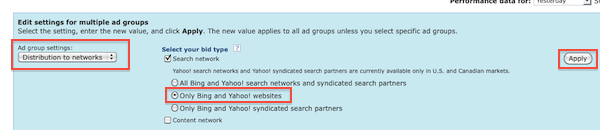
By default you’ll see that Adcenter has opted you into “All Bing and Yahoo! search networks and syndicated search partners” for your existing Adcenter campaigns.
To change this setting in the Adcenter online UI:
  1. Drill into your campaign and check the box next to “Adgroup” to select all of the adgroups in that particular campaign.
  2. Then click the “More” button and select “Bulk Edit”
  3. From the drop down selector box in the blue area choose “Distribution to Networks” and you can bulk edit your adgroup’s search configuration.
Change Adcenter Campaign to Core Search Only

Sweet Release

Now advertisers can choose option number 2 under the search network to focus on Bing and Yahoo’s core search traffic exclusively, which in my experience yields much higher conversions at a considerably lower long-term cost.
You can see this new option (provided it’s completely rolled out) by clicking “Create Campaign” and scrolling to the bottom under “Adgroup Settings”

Sweet! Adcenter Lets Advertisers Segment Search Traffic

14 Comments Written on September 28th, 2010 by Geordie
Categories: Microsoft Adcenter, PPC Tools, Yahoo
One of the big advancements that made Yahoo advertising profitable again for a lot of advertisers was a new setting that allowed you to exclude the Yahoo search partner traffic and run your ads exclusively on Yahoo’s core search engine.
With the transition to Adcenter, advertisers lost that control, and I personally wondered when/if Microsoft would roll out similar controls.
Looks like Microsoft’s implementation of this went live today (or very recently at least)…
Hat tip to Matt Umbro for spotting this early and tweeting it out!
5. Tool: WordTracker
Good for: Finding popular, low-cost keywords for PPC campaigns, finding longer tail search terms and synonyms for SEO
URL: http://freekeywords.wordtracker.com
WordTracker is the doyenne of keyword research tools. While it is primarily a subscription service, you can use the free version to generate lists of keywords restricted to 100 phrases. The full version combines the extensive search term database with useful tools for mining the data, but the free version is a great starting point and an ideal try-before-you-buy solution for skeptics. The trial allows you to find keywords that include your specified search term, so it’s a useful resource if your PPC budget is being used too quickly by expensive terms.
4. Tool: WordStream Keyword Niche Finder
Good for: Creating a deeper, more dynamic keyword structure for your PPC campaigns and SEO copy
URL: http://www.wordstream.com/keyword-niche-finder/
WordStream’s relatively new Keyword Niche Finder tool is an excellent asset for content writers, providing in-depth long tail keyword variations for any given word or phrase. The tool creates groups of tightly related niche groups of keywords, ideal for making longer tail additions to paid search campaigns. Keywords are organized into groups for ease of use, taking hours out of the campaign creation process.
3. Tool: Meta Glossary
Good for: Broadening SEO keyword lists, suggesting synonyms for use in optimized web content

A virtual repository of information, MetaGlossary is dictionary and keyword finder in one. Type in a term and it will display a comprehensive selection of related terms and synonyms for your keyword lists. What’s more, a second tier displays concise, direct explanations for terms and phrases including technical jargon and slang, extracted from around the internet.
This summary is not available. Please click here to view the post.
1. Tool: Google Sets
Good for: Compiling keywords for PPC adgroups
URL: http://labs.google.com/sets
A Google Labs innovation, Google Sets helps create lists of keywords based around a common theme. It gives you a choice of a small set (a list of 15 words or less) or a larger set. Simply type in a few terms, hit ‘Large Set’ or ‘Small Set,’ and the app will create a suggested set of other words to fill out your list.

5 Free Keyword Research Tools To Try For SEO And PPC Success

Keyword selection is the be-all and end-all of search engine marketing success. Get it right and you have a good chance of capturing more traffic by being seen for the most appropriate phrases. Get it wrong and no matter how visible you are for your selected terms, you’ll never experience true online success. So simple. So complicated.
Fortunately, there are many keyword research and keyword suggestion tools available online to help. Use them periodically to select phrases for a new PPC ad group, check suitability of SEO words, and confirm that you’re not missing a trick with new search trends.

PPC-GC-Tools is a tool for geocachers who want to take advantage of their Pocket PC or Windows Mobile phone.

PPC-GC-Tools is a tool for geocachers who want to take advantage of their Pocket PC or Windows Mobile phone.
Here are some key features of "PPC-GC-Tools":

· Direct access to GSAK databases
· HTML display
· Field Notes
· Hint decoders and encryption
· Various coordinate functions (conversion, bearing, intersection, etc.)
· Math Solver
· Converter (Text to numbers, SMS numbers, etc.)
· Pedometer
· Notepad

Requirements:

· .NET Compact Framework 3.5 Redistributable

What's New in This Release: [ read full changelog ]

· Enabled all database edit functions again (has to be enabled in the settings)
· The HTML Viewer doesn't load the last opened page anymore, as this caused problems on some devices
· Changed appearance completely
· Moved setting of Field Notes path to settings screen
· Folder selection screen uses 32x32 icons on VGA devices now
· BUGFIX: A click on Reset in the Solver resets the correct second expression now
· Improved Grabbed Images support
· BUGFIX: Fixed a problem when the path for the place search database contains spaces
· Added support for new geocaching.com cache attributes
· Added wait cursor, when opening a database
· Added function to the context menu to add the current date/time or CacheCount to the Field Notes log.
· Added icon for new log type "Announcement"
· It's now possible to add and remove fields for the cache overview
· Uses new files.db3 for grabbed images as introduced in GSAK 7.7.3.14
· BUGFIX: Fixed a problem with the Field Notes, when a cache was found before 10:00
· If you have entered something into the log section and create a Field Note afterwards the log text will be copied
· BUGFIX: If there is only something entered into the log section it's now saved correctly
· Changed control for coordinate functions to be more finger friend
Checkpoint® Tools
Checkpoint Tools conform to the way you work in a familiar Word or Excel format whether you prefer print, CD, or online guidance. It is easy to implement these electronic tools into your workflow since the convenient Word and Excel format eliminates learning curve and manual copy and paste of information. Checkpoint Tools work with any leading paperless engagement software or with Word and Excel alone.
Checkpoint Tools can be easily installed to your local computer by downloading from Checkpoint, the industry leading online research platform. Reference links in the Checkpoint Tools documents allow you to access content specific guidance in your subscribed PPC guides on Checkpoint with the click of a mouse.
Google Analytics

Google Analytics is no doubt the best free web analytics tool available, PPC campaign data can be easily tracked and segmented for you to further understand your campaign. If you haven’t used it yet, I strongly recommend you doing so. It’s crucial to set up  goals to track ROI, view funnel visualisation to determine where the bounces happen and  concentrate on the trends of campaign performance.

These are the best FREE PPC tools in my opinion, if you have any recommendations please leave them in the comments.

    Tools for web analytics


Any online marketing campaign needs to be monitored from day one, if you don’t track your web data, your campaign is dying soon.

Google Website Optimiser


Google website optimizer provides two options for you to optimise your landing page, A/B split test and multivariate test. A/B split test works better for landing page with low traffic, MVT normally works better for landing pages with high traffic.

You can always improve your landing page using landing page optimiser, even it’s just a tiny improvement.
Spyfu

It gives you a quick snapshot of how much your competitor is spending and what keywords they are targeting. You can also come up some new paid keywords idea from this wonderful tool, though you have to pay if you want to know all the keywords the competitor is paying.

It is good at understanding this factor:

•    Keyword Competition
•    Relevant keywords

Tool for landing page optimisation

Once you have your PPC campaigns alive, traffic will go through if keywords are well-targeted and ad copies are well-written. But will these traffics convert? You might say: I hope so! We cannot hope, instead, we need to test and improve.

    Tool for competition research


It’s important to know who you are competing with and their paid strategy. Most of the time, you can seek out some opportunities from observing their paid strategies.
Keyword Misspelling Tool

You cannot imagine how many searchers are typing misspelled queries every day, and they are not very interested in correcting it because Google will help them. For example, how are you going to spell “misspell”? Maybe “mispell”? The funny thing is, this keyword misspelling tool page even spelled it wrong in its title tag. (Probably on purpose)

Nobody can afford to miss this massive opportunity, and the best part of it is you will have less competition, i.e. higher click through rate and lower cost per click.

It’s good at understanding this factor

•    Misspelling
Microsoft Commercial Intention

Do you know if your keyword is informational or transactional? If it’s informational, visitors are likely to know more relevant information. But if it’s transactional, visitors will be more likely to put money in your pocket. But how will you determine it? Use common sense or 6th sense?

No, don’t trust your feeling, trust data. Microsoft adlab has a great tool to help you determine if a keyword is commercial or non-commercial.

It’s good at understanding this factor

•    Informative or transactional
Wordstream’s Free Negative Keyword Tool

We all know the importance of negative keywords, it’s critical to quality score optimisation. But PPC managers have been struggling to find negative keywords for a long time. The most accurate way to generate negative keywords is to set up an advanced filter to track exact search queries that searchers type in. But that means you will have to monitor it day by day and add negative keywords continuously.

We really want to have a list of negative keywords at the start of a campaign. Although there is some kind of “general negative keywords” for you to download, many keywords in that list will not suit your campaign.

Wordstream’s FREE negative keyword tool gives you a great idea of what search terms you should avoid. These negative terms are not generated by common sense, but relevant searches. Take an example, “ppc tools”, it shows results such as “ppc hacking tools” and “ppc Bluetooth tools”.

It’s good at understanding these factors

•    Negative keywords
•    Relevant keywords

Thesaurus

How many synonyms can you think of for word “travel”? “journey”, “tour”, “trip”…etc, I am pretty sure you can even name a few more. On thesaurus, there is a full list of synonyms for every word you type in, it gives you a wide range of keyword variations that you may never think of.

It’s good at understanding this factor

•    Synonyms
Wordtracker
Wordtracker is a great addition to Google adwords keyword tool, it collects data from dogpile and metacrawler. Although its data is only a small fraction of the entire search query data pool, it can give you the exact search volume on each keyword, and also many relevant long tail keywords. I would say wordtracker is often more inspirational than Adwords keyword tool, because of these highly relevant long tail keywords.

Note: wordtracker’s free version only shows US search queries, if you need UK search queries you will have to pay.

It is good at understanding these factors:

•    Relevant keywords
•    Search volume
Google Adwords keyword tool

It’s obvious, isn’t it? Google Adwords keyword tool uses its own search query database, it gives you an estimated search volume for every relevant keywords. You would’ve thought the search volume it carries out must be very accurate because of the data they have, but it’s NOT that accurate. Don't take my word, try comparing estimated search volume vs. impressions your campaign generates. (of course you need enough budgets to capture all the impressions) None the less, it’s still one of the best PPC tools you should rely on.

It is good at understanding these factors:

•    Relevant keywords
•    Search volume
•    Keyword competition

    Tools for keyword research


Keyword research is crucial to the success of a campaign, because a campaign will bring you revenue (or other benefits) only if you target the right keywords. You cannot judge a keyword by just looking at it and say, “oh, seems I don’t use this query often, so other people won’t either”. Tools will provide you this data, although it’s not always accurate, you should place more trust on these figures than your instinct.

The most important factors to take into account:

•    Relevant keywords
•    Search volume
•    Keyword competition
•    Synonyms
•    Misspellings
•    Negative keywords
•    Informational or transactional

Best Free PPC Tools You Ever Need For A Successful Campaign

29/06/2010
Posted by Rui Jiang
From my last post, “how to promote your website by ppc”, we know that it’s not easy to create a successful ppc campaign, there are many factors you need to take in to account. Therefore, you need a lot of assistance to accomplish this complicated task, tools are your best friends.

Today, we are going to tell you what the best tools are for your ppc campaign, and yet. The best thing is they are FREE.

best free ppc tools


10 Free PPC Tools to Enhance Campaign Performance


There are several useful tools available for strategizing search engine marketing. You must have heard about Hitwise and Omniture, premium search engine marketing tools. But does everyone have access to these premium tools? Of course, not. Not to worry, there are some free PPC tools available for you as well. The efficacy and the ease of use of these top free pay per click marketing tools make them all the more effective. Out of the multiple free resources for planning your PPC keyword strategy, given below are the top 10 free pay per click tools that can really help you enhance the performance of your PPC campaigns.

#1. GoogleGoogle offers around 11 free tools to conduct your pay per click campaign research. To find out which ones are more suitable for your requirements, you can try using them on your own and find out how they work for you. Some of these free tools include Google Analytics, Google Adwords Editor, Google Traffic Estimator, Google URL Builder, Google Ad Planner etc.

#2. SpyfuThe tool offers both free and a pro version. Using this PPC tool, you can find out the keyword gaps that you may have with your competitor. The free tool offers you competitive intelligence for keywords and ad copy, assisting you to plan an effective pay per click advertising campaign for your products and services.

#3. Ad Words WrapperIf you are looking to create some great match types, this PPC tool proves to be a useful option for advertisers.

#4. Compete
This free PPC tool has similarity with Spyfu. However, you may get different results some times. Therefore it is advisable to reference both the tools for maximum benefits.

#5. MSN Ad LabThe ad lab offers advertisers a range of free research tools for getting an insight into audience intelligence and researching keywords. The free tools offered by MSN Ad Lab are really very effective in conducting online market research.

#6. Keyword MixerAs the name suggests, the free tool helps you to combine keywords for creating a long-tail keyword list.

#7. Niche Keyword FinderIf you are building your keyword profile, niche keyword finder happens to be an excellent free PPC research tool. It provides you with a list of niches associated with your root or base keywords. Use it yourself to understand how the tool offers you great value.

#8. Typo GeneratorAs you enter a keyword in the box, the tool returns you a list of suggestions including human misspellings and typos. Use the tool to see how it can help you in your keyword research.

#9. Keyword MapThis yet another keyword research tool, available to you for free. This free PPC research tool returns you visual results which can further help you to build your keyword profile for your pay per click advertising campaigns.
 #10. Geo Keyword List GeneratorIf you are looking to build a geo-modified list of keywords, this free pay per click research tool can be a great tool for you. As soon as you enter a zip code and a radius, the tool returns you all the zip codes and abbreviations of applicable geo in that specific area.

To make your pay per click campaigns be successful, you need to plan out an effective marketing strategy, of which building an appropriate keyword portfolio is the most essential part. You can use the free pay per click research tools listed above to conduct their keyword research and gain an insight into competitive intelligence. It is extensive research that will help you plan a power PPC marketing strategy and lead your campaign to success.

So What’s the Catch?

As with anything, our new free tools are imperfect. While they’re free, you do have to spend a few seconds creating a free WordStream account to use them, and once you do we’ll occasionally send you relevant Email communications about the tools themselves, or about some of our products you might be interested in.
The Free Keyword Niche Finder works off our own database, and as with any keyword tool, you have to be careful not to be over-reliant upon keyword suggestion data. That’s one of the neat things about The Free Keyword Grouper, though: you can take blended data from multiple tools, or even your own log file or analytic data (which you know to be accurate) and run the tool against that.
Finally: this is just a start. If you’re going to develop really effective paid search campaigns, you need to do a lot more work building out specific Ad Groups and then monitoring their performance to have a really effective paid search account structure. That said these tools are free and easy to use, and we think you’ll find a good deal of utility in them. If you have questions, feedback, or future feature requests, please leave them in the comments!

The Free Keyword Grouper – Finding Keyword Niches in Your Own Lists and Data

Our other free tool, The Free Keyword Grouper, offers pretty similar functionality, but instead of asking for a keyword as input, it groups your existing data (whether you generated a list from a keyword suggestion tool like the SEO Book Keyword Suggestion Tool or WordStream’s Free Keyword Tool), or allows you to export data from your analytics or a search query report, drop it into the tool, and then The Free Keyword Grouper segments that data for you:
An image of WordStream’s Free Keyword Grouper.
If you drop in a list of keywords, it’ll spit back a list of results similar to what you would find with The Free Keyword Niche Finder. This is a nice way to look at either a list you already have, or to examine historical data on a client site or an existing site you may be taking over. You can then leverage the same advantages The Free Keyword Niche Finder offers

  PPC Campaign Structure Suggestions

One of the neatest things about this tool from a PPC standpoint is that if you’re starting a new paid search account or campaign, you can get some great suggestions for either high-level campaign ideas, or even for actionable Ad Groups (depending on the term you put in). Following our example from above, we might turn each of the top ten suggestions into high-level campaigns. From there, we could drill down to find specific Ad Groups for each of our campaigns. Let’s take one of the more popular niches, refurbished laptops – dell, and enter that keyword into the Niche Finder:
Using WordStream’s new free tools for a stronger PPC campaign structure.
Assuming were using Refurbished Dell Laptops as a campaign, these would make for a series of pretty tight Ad Groups, ranging from around 10 keywords to around 35, and allowing us to write a very targeted ad and create a very specific, compelling landing page for each group

 Suggested Keyword Variations Within a Group

The tool also shows you closely related variations, as you can see above, so that you can structure a single landing page and Ad Group/ad text to target a variety of phrases, allowing your campaigns to generate more ROI and to become more scalable

1. “Keyword Niches“ Versus Single Keywords

It’s interesting to compare the results of a traditional keyword tool to The Free Keyword Niche Finder.
Here is the list of results from our Free Keyword Tool:
WordStream’s Free Keyword Tool
Now let’s look at the results for the same topic using The Free Keyword Niche Finder:
WordStream’s Free Keyword Niche Finder
The interesting thing here is in the difference between the two results, and the way that the two tools function. The Free Keyword Tool looks at the volume of results across a variety of sources (ISPs, search engines, and toolbars). The Free Keyword Niche Finder, meanwhile, takes the same data that The Free Keyword Tool is using (our own database) and then clusters that information semantically.
So what we’re seeing here is that some keywords have a longer or more substantial “tail”. Look:
A look at the difference between a single keyword and the keyword’s entire long tail
The aggregated keyword “niches” are more centered around brands. If we dig deeper into the refurbished laptops – ibm cluster we get a pretty good idea of why the tail for brands is longer:
Image depicting the keywords that may be hidden in the long tail of a word or phrase.
So while “used refurbished laptops” is a more popular single query than “refurbished laptops ibm”, the sum of the refurbished laptops keyword niche is actually greater, and it contains more specific, buy-focused terms.
By looking at the data side-by-side, it definitely appears that IBM refurbished laptops is a more profitable keyword niche to attack

Two New Free PPC Keyword Tools: WordStream’s Free Keyword Niche Finder & Free Keyword Grouper

At WordStream, we just launched a couple of free tools I think paid search marketers can get a lot of utility out of. I’ll walk through how both of them work and what you might be able to use them for.
The first tool is something we’re calling The Free Keyword Niche Finder. Basically the premise is that rather than offering you single keyword suggestions we’re showing you the pockets of keywords (or “keyword niches”) that are the most popular.
This is valuable for a few reasons:
  1. Keyword Niches Versus Single Keywords – It helps you prioritize your content, keyword targeting, and campaign/AdGroup creation based on an entire “keyword universe” surrounding your topic. Many times you’ll find the most popular keyword you could target will have the “longest tail,” but not always.
  2. Suggested Keyword Variations – It shows you popular variations within a given keyword cluster, or niche – this helps you to vary page content and anchor text: something real SEOs advocate – and it helps you to structure comprehensive PPC campaigns or Ad Groups
  3. Campaign Structure Suggestions – It helps you to create a nice semantically-themed campaign and/or Ad Group structure for paid search account creation
I’ll walk through each of these advantages, and then introduce another tool we’re introducing called The Free Keyword Grouper.